
You are using an out of date browser. It may not display this or other websites correctly.
You should upgrade or use an alternative browser.
You should upgrade or use an alternative browser.
[Unofficial] Feature Request / Suggestion List
- Thread starter Weyland
- Start date

timseb
进士
Should also be customizable in 4.0, but as far as basic/default behavior goes we have a lot more users with totally incorrect pinyin who'd like it to nevertheless match something than people with rare pinyin readings they'd like the app to reject

I e-mailed MoE by the way. I doubt they'll send me anything but one can always hope.

Fernando
榜眼
I e-mailed MoE by the way. I doubt they'll send me anything but one can always hope.
Please let us know if they do. Their work is solid and should be more widely available.


metri
Member
That made my day! ThanksThat's supported now - Settings / Definition Screen / Stroke / Background.

jurgen85
榜眼
Inflexible pinyin interpretation errors
When "flexible pinyin splits" is off, some invalid syllables are still prioritized. E.g. searching "fanguan" is interpreted as "fang-uan" which gives no results, even though it could only mean "fan-guan", since "uan" is invalid pinyin for "wan". Similar for "yunian" (invalid for yun-yan), "jinguan" (jing-wan), "zuoer" (???), "jianguo" (jiang-wo), "xining" (xin-ying), etc.
When "flexible pinyin splits" is off, some invalid syllables are still prioritized. E.g. searching "fanguan" is interpreted as "fang-uan" which gives no results, even though it could only mean "fan-guan", since "uan" is invalid pinyin for "wan". Similar for "yunian" (invalid for yun-yan), "jinguan" (jing-wan), "zuoer" (???), "jianguo" (jiang-wo), "xining" (xin-ying), etc.
Last edited:

Inflexible pinyin: yes, this is a known issue - with 'flexible pinyin' off it does a purely greedy breakdown. (as with so many other things this is fixable in 4.0)
Spaces: not seeing this issue here - are you sure you typed it correctly? What platform / version of Pleco are you using?
Spaces: not seeing this issue here - are you sure you typed it correctly? What platform / version of Pleco are you using?
jurgen85
榜眼
Pleco version: 3.2.75
Android version: 10
I only have ABC and Oxford dictionaries enabled in the "All Chinese Dicts" group, in that order, and this is the group I'm searching in. Swapping the order of them shows 尽管 but hides 金冠 and shows the wrong dictionary for everything under 尽管. (See attached screenshots)
I have another group with GF, MOE and Cross-Straits, which does work.
"Dictionary search order" is set to ”From Current”. All other "Search Engine" options are enabled, except:
- Flexible pinyin splits
- Search for umlauts on u's
- Sort Chinese by pinyin
- Jump to appended word
Android version: 10
I only have ABC and Oxford dictionaries enabled in the "All Chinese Dicts" group, in that order, and this is the group I'm searching in. Swapping the order of them shows 尽管 but hides 金冠 and shows the wrong dictionary for everything under 尽管. (See attached screenshots)
I have another group with GF, MOE and Cross-Straits, which does work.
"Dictionary search order" is set to ”From Current”. All other "Search Engine" options are enabled, except:
- Flexible pinyin splits
- Search for umlauts on u's
- Sort Chinese by pinyin
- Jump to appended word
Attachments
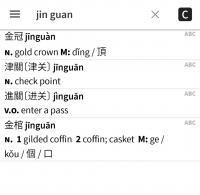
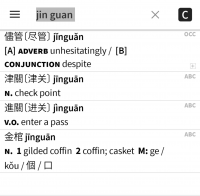
Last edited:
Alex Green
Member
Another great improvement would be to add a setting in the OCR block of settings to choose which character base to use while doing OCR: Simplified, Traditional or Simplified+Traditional. If the user knows the fact that the text he tries to OCR contains only a definite set of characters, it would be reasonable to exclude all the other characters so that they would not interfere in the process and cause frustration, besides it would accelerate the execution of the OCR algorithm.
Last edited:
Are iOS 14 widgets now versatile enough for a Pleco lookup widget to make sense? I suppose I could just open Pleco from its place on the homescreen and search for a word that way, like an animal, but a lookup widget on my homescreen would save me a whole tap -- literally fractions of a second!
Another great improvement would be to add a setting in the OCR block of settings to choose which character base to use while doing OCR: Simplified, Traditional or Simplified+Traditional.
Not currently supported by our OCR engine, weirdly enough, but definitely something to add when we update or replace it.
Are iOS 14 widgets now versatile enough for a Pleco lookup widget to make sense? I suppose I could just open Pleco from its place on the homescreen and search for a word that way, like an animal, but a lookup widget on my homescreen would save me a whole tap -- literally fractions of a second!
They're actually totally non-interactive; they also made that change for Today widgets, so I'm glad I never invested the effort into building one of those
Hopefully this is just a technical constraint - something they didn't have time for in the midst of COVID - and will get better in iOS 15, but there's not much we can do with them as presently constituted.
rizen suha
状元
hey, text is better in reader now (epub), spacing is improved! means more text fits on each page. great, thx. noticed that search in reader now points to erroneous pages, maybe it calculates page index according to the old layout?
rizen suha
状元
actually the extra text gained on each page is awesome, made my night. thanks a lot!
noticed that search in reader now points to erroneous pages, maybe it calculates page index according to the old layout?
Possibly, will investigate - thanks!