You are using an out of date browser. It may not display this or other websites correctly.
You should upgrade or use an alternative browser.
You should upgrade or use an alternative browser.
3.2.x Bug Report / Feedback Thread
- Thread starter mikelove
- Start date


I’m running iPad iOS 16.1 (beta), and I don’t seem to be able to open pdf files in Pleco via the share button (Pleco doesn’t show up in the menu, even when clicking the more button). However, this action does work properly on my iPhone running iOS 16.
Honestly the share button is unreliable in pretty much every iOS version so I wouldn't necessarily attribute this to 16.1 - does it help if you reboot your iPad? That might make it update its index of which apps can open which file types so that it will again show Pleco as a destination for PDFs.
if you save the PDF to "On my iPad" in Files, are you able to open it as an "External File" in Pleco?
Thanks for the response. Reboot unfortunately didn’t resolve it, but PDFs can indeed be opened manually via “Open Document” within Pleco. The share button used to work for me on the iPad so maybe it’ll come back with a subsequent iOS update.Honestly the share button is unreliable in pretty much every iOS version so I wouldn't necessarily attribute this to 16.1 - does it help if you reboot your iPad? That might make it update its index of which apps can open which file types so that it will again show Pleco as a destination for PDFs.
if you save the PDF to "On my iPad" in Files, are you able to open it as an "External File" in Pleco?
Share button working properly again after latest iPadOS beta install.Thanks for the response. Reboot unfortunately didn’t resolve it, but PDFs can indeed be opened manually via “Open Document” within Pleco. The share button used to work for me on the iPad so maybe it’ll come back with a subsequent iOS update.
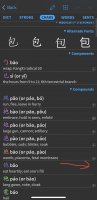
Yes, that's due to the nature of how we match flashcards against dictionary entries - the CHARS tab shows just an isolated character without a traditional/simplified variant and so it doesn't reliably match a flashcard that might have both character sets. (the reason why we do it this way is that otherwise you might have a flashcard for 幾 'how many' and not 几 'table' and nevertheless have both characters show up with [+] icons / be unable to easily create a new flashcard for 几 because it's a duplicate)
We actually never intended to show flashcard indicators in that tab at all, but we're worried that if we take them away in a minor update now we'll have people mad at us, so we're waiting for a better opportunity to fix or remove them.
We actually never intended to show flashcard indicators in that tab at all, but we're worried that if we take them away in a minor update now we'll have people mad at us, so we're waiting for a better opportunity to fix or remove them.
Ok, Hope your choice will be to fix it! I find it very useful to show the flashcards on top, like in ‘words containing’.