
You are using an out of date browser. It may not display this or other websites correctly.
You should upgrade or use an alternative browser.
You should upgrade or use an alternative browser.
Flashcards: Mark headword in Outgoing links field
- Thread starter Shun
- Start date

Shun
状元
Hello Mike,
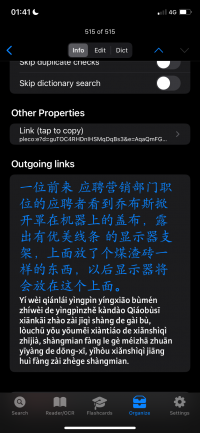
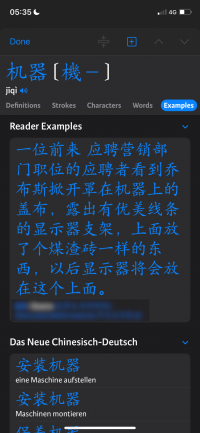
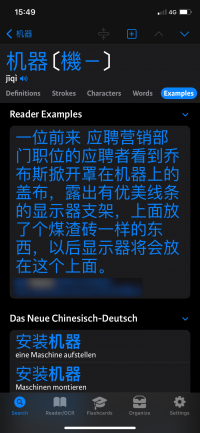
adding a new flashcard from a text file in the .25 build, I can't find the automatically saved context anymore—neither at the bottom of Card Info nor in the dictionary's Example tab. Could some setting have disabled it?
Writing this post, a new idea occurred to me: If a flashcard with context information already exists and the flashcard is added to an additional category with the "+" button, could one configure it such that the new context is added to the previously saved context info instead of replacing it? In that way, one could collect more and more good example usages for a particular word. Or is that perhaps already how it's designed to work?
Thanks,
Shun
adding a new flashcard from a text file in the .25 build, I can't find the automatically saved context anymore—neither at the bottom of Card Info nor in the dictionary's Example tab. Could some setting have disabled it?
Writing this post, a new idea occurred to me: If a flashcard with context information already exists and the flashcard is added to an additional category with the "+" button, could one configure it such that the new context is added to the previously saved context info instead of replacing it? In that way, one could collect more and more good example usages for a particular word. Or is that perhaps already how it's designed to work?
Thanks,
Shun

Not aware of any recent changes that would affect this but will double check.adding a new flashcard from a text file in the .25 build, I can't find the automatically saved context anymore—neither at the bottom of Card Info nor in the dictionary's Example tab. Could some setting have disabled it?
If you set 'sentence cards' to 'button' instead of 'automatic' in the reader settings, there'll be a separate button you can tap on to add a new context sentence to flashcards, and adding it will also add it to the current flashcard. (it will appear with dots around it if the current card isn't yet linked to that context sentence - you can tap on it in that case to add it to that card too)Writing this post, a new idea occurred to me: If a flashcard with context information already exists and the flashcard is added to an additional category with the "+" button, could one configure it such that the new context is added to the previously saved context info instead of replacing it? In that way, one could collect more and more good example usages for a particular word. Or is that perhaps already how it's designed to work?
Shun
状元
Not aware of any recent changes that would affect this but will double check.
Thanks! I now see what was wrong: I had "Sentence cards" set to "none" for some reason.
If you set 'sentence cards' to 'button' instead of 'automatic' in the reader settings, there'll be a separate button you can tap on to add a new context sentence to flashcards, and adding it will also add it to the current flashcard. (it will appear with dots around it if the current card isn't yet linked to that context sentence - you can tap on it in that case to add it to that card too)
I'm delighted to hear that. It's perhaps best to use the "button" mode, which forces one to add everything manually.
Last edited:
Shun
状元
Hi,
In EPUB or TXT files where there is linear text, the sentence in which a word appears is saved with its flashcard. In a OCR'ed document, it's less predictable, like in this example:
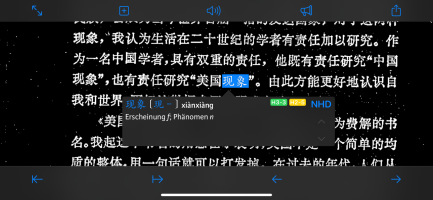
What is saved:
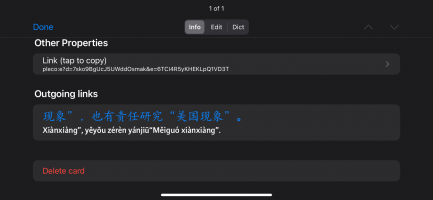
For OCR, could one perhaps make it so the previous and following two lines are added as context to a flashcard? Generally, could one make the amount of context saved with a flashcard configurable? Apologies if that's already possible with an Expert option. Thanks!
In EPUB or TXT files where there is linear text, the sentence in which a word appears is saved with its flashcard. In a OCR'ed document, it's less predictable, like in this example:
What is saved:
For OCR, could one perhaps make it so the previous and following two lines are added as context to a flashcard? Generally, could one make the amount of context saved with a flashcard configurable? Apologies if that's already possible with an Expert option. Thanks!
Actually I'm sorry to say that the intent was that OCR would not support sentence contexts at all, because even when it works correctly you've got to deal with situations like a sentence spanning pages and there's not really a reliable way for us to get OCR text from the previous / next page of a document if you haven't checked it yet.
It seems like in this case it's simply failing to extend to the previous line - if we do eventually support this officially we can make sure that's addressed, thanks.
It seems like in this case it's simply failing to extend to the previous line - if we do eventually support this officially we can make sure that's addressed, thanks.
I think we'd have to store it in a different place - the idea with the sentence contexts is that at the same time you're also creating a card for the sentence, which you can then use for cloze testing or whatever else you like. But a multiple-sentence context isn't really as useful as a discrete flashcard, so we'd need to work up another mechanism for storing / linking to those.
So it's a possibility for a future update, but it's dicey enough that I don't think we could come up with a way to do it that we were happy with for 4.0.
So it's a possibility for a future update, but it's dicey enough that I don't think we could come up with a way to do it that we were happy with for 4.0.