
You are using an out of date browser. It may not display this or other websites correctly.
You should upgrade or use an alternative browser.
You should upgrade or use an alternative browser.
Beta 8 Bug Report / Feedback Thread
- Thread starter mikelove
- Start date
images in dictionaries looking really great.
hope some day we will be able to include our own images in user dictionaries.
-- browsing dictionaries: in popup mode the menu bar is positioned too high
-- I thought that in previous versions I was able to save a new (clipboard) file directly to my dropbox folder. No? Maybe I'm mistaken.
(iphone 5, ios 6)
and maybe a suggestion for future consideration:
I have set the headwords to display both character sets. This is great for search or individual dictionary entries.
Organizing my flashcards, the display of both character sets + pronunciation + definition in a single line makes it a bit confusing.
hope some day we will be able to include our own images in user dictionaries.
-- browsing dictionaries: in popup mode the menu bar is positioned too high
-- I thought that in previous versions I was able to save a new (clipboard) file directly to my dropbox folder. No? Maybe I'm mistaken.
(iphone 5, ios 6)
and maybe a suggestion for future consideration:
I have set the headwords to display both character sets. This is great for search or individual dictionary entries.
Organizing my flashcards, the display of both character sets + pronunciation + definition in a single line makes it a bit confusing.
I have an odd issue with OCR that was present in previous betas but I didn't get around to reporting it.
There are a couple of lines in a PDF doco that I have that Block Recogniser refuses to recognise. The other modes don't have any problems and I can't see what's wrong with these lines that would stop them being recognised.
In the attached screen shots you can see that there are two indented lines about 1/4 of the way down that don't get recognised, and closer to the bottom, a line starting with "OK" doesn't work either.
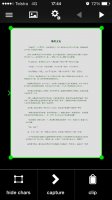
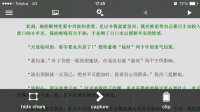
If I switch to either of the other two modes, the lines are recognised.
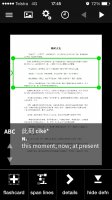
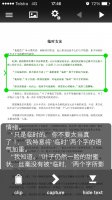
If I switch back to Block Recogniser and resize the box so that it is smaller, it still doesn't see these two lines.
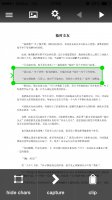
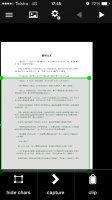
It's not new in Beta 6/7/8 and I don't think it's worth holding up the release for this, but it does look like a bug to me and I thought you might like to add it to the queue of things to look at.
There are a couple of lines in a PDF doco that I have that Block Recogniser refuses to recognise. The other modes don't have any problems and I can't see what's wrong with these lines that would stop them being recognised.
In the attached screen shots you can see that there are two indented lines about 1/4 of the way down that don't get recognised, and closer to the bottom, a line starting with "OK" doesn't work either.
If I switch to either of the other two modes, the lines are recognised.
If I switch back to Block Recogniser and resize the box so that it is smaller, it still doesn't see these two lines.
It's not new in Beta 6/7/8 and I don't think it's worth holding up the release for this, but it does look like a bug to me and I thought you might like to add it to the queue of things to look at.

Alexis
状元
Bug:
- Search for 色
- Click on the headword
- Switch to the ABC dictionary (if not already displayed) in the pop-up definition bubble
- Click on the B.F. link
- Definition area jumps to the definition for .45
Usability:
It would be nice if, after a search, a touch in the definition or word list region hid the keyboard. Since I kept the keyboard open after searching (Because I didn't hit the collapse keyboard button), I didn't initially realize there was the very useful toolbar on the bottom.
- Search for 色
- Click on the headword
- Switch to the ABC dictionary (if not already displayed) in the pop-up definition bubble
- Click on the B.F. link
- Definition area jumps to the definition for .45
Usability:
It would be nice if, after a search, a touch in the definition or word list region hid the keyboard. Since I kept the keyboard open after searching (Because I didn't hit the collapse keyboard button), I didn't initially realize there was the very useful toolbar on the bottom.

sk - sure, one of our Big Projects for next year (as part of the larger-scale flashcard system redesign) is allowing for more sophisticated formatting in user dictionaries and custom flashcards. Though a big thing we'd debating now is whether to give users more control over formatting (bold / indent / etc however you like) or whether to keep fine-grained format control a Pleco-only thing and simply let users tag content semantically - you specify where the examples / usage notes / parts of speech / etc are and we figure out how to render them prettily (and then update that format as it changes in our app).
"browsing dictionaries: in popup mode the menu bar is positioned too high" - could you expand on this? Not quite sure what you mean by "browsing dictionaries" (which exact screen?) or "menu bar" (the top toolbar?).
Saving clipboards (or any type of file) directly to Dropbox proved problematic so we punted that for now but will bring it back in a few releases once we've gotten the bugs worked out - not supporting it seems better than supporting it and having files go randomly missing / not save correctly.
For flashcards, in Settings / Flashcards you can configure the list layout in flashcards to be whatever you like, so perhaps it would make sense to separate the headword / pinyin / definition more.
sych - old issue, actually; difficult for us to fix directly since it's happening at the lower levels of our OCR library, but we've been slowly replacing a larger and larger portion of its code with our own and eventually should be doing pretty much all of the front-end processing (figuring out where lines of text are) ourselves, at which point we can make more headway on this sort of issue.
Alexis - good catch, thanks. But which toolbar are you referring to? There isn't any toolbar on the bottom of the screen in 3.0, except for the optional dictionary-switching slider and that should move itself above the keyboard when it's open.
"browsing dictionaries: in popup mode the menu bar is positioned too high" - could you expand on this? Not quite sure what you mean by "browsing dictionaries" (which exact screen?) or "menu bar" (the top toolbar?).
Saving clipboards (or any type of file) directly to Dropbox proved problematic so we punted that for now but will bring it back in a few releases once we've gotten the bugs worked out - not supporting it seems better than supporting it and having files go randomly missing / not save correctly.
For flashcards, in Settings / Flashcards you can configure the list layout in flashcards to be whatever you like, so perhaps it would make sense to separate the headword / pinyin / definition more.
sych - old issue, actually; difficult for us to fix directly since it's happening at the lower levels of our OCR library, but we've been slowly replacing a larger and larger portion of its code with our own and eventually should be doing pretty much all of the front-end processing (figuring out where lines of text are) ourselves, at which point we can make more headway on this sort of issue.
Alexis - good catch, thanks. But which toolbar are you referring to? There isn't any toolbar on the bottom of the screen in 3.0, except for the optional dictionary-switching slider and that should move itself above the keyboard when it's open.
one of our Big Projects for next year
thanks for this preview. I would think that letting users tag content semantically and you control the design will look better, less messy and therefore provide a better user experience. there a quite a lot of parameters we can set already. Keep Pleco Pleco.
"browsing dictionaries: in popup mode the menu bar is positioned too high" - could you expand on this?
Settings > Manage Dictionaries > (any dictionary) > Browse Dictionary Entries > (any entry in list) > (then on screen of single entry tapping on any Chinese character) :
Pop-up and new toolbar on top of screen are displayed. The toolbar is positioned a few pixels too high, is cut off on top and reveals regular toolbar below.
Happend all morning, now I cannot reproduce it. Same thing happened in the first beta in reader mode.
Will send a screenshot once it will happen again.
Settings / Flashcards you can configure the list layout
Thank You. And sorry. I must have missed these settings. Too many options...
Alexis
状元
Alexis - nope, that actually means "see also" so the definitions are correct
Ha!
Which female voice? Recorded (Mandarin or Cantonese?) or text-to-speech (paid or free-built-into-iOS)?
I don't believe there's an API to change the hardware volume control mapping, unfortunately - it adjusts whatever you're listening to right now, and if we're not currently playing audio then it falls back on the ringer volume.
I don't believe there's an API to change the hardware volume control mapping, unfortunately - it adjusts whatever you're listening to right now, and if we're not currently playing audio then it falls back on the ringer volume.
Alexis
状元
I don't believe there's an API to change the hardware volume control mapping, unfortunately - it adjusts whatever you're listening to right now, and if we're not currently playing audio then it falls back on the ringer volume.
Not sure what's different, but in the Skritter app, the volume control changes the volume of the audio (not the "sound effect" volume).
I'll add that to our audio bug list, thanks.
TTS isn't available as a fallback on iOS 6, but yeah, we can probably think about phasing that out once we go iOS7-only.
Not sure how Skritter does it differently, perhaps they're keeping the audio session open all the time - a more reasonable step for them because they're expecting to play audio continuously (as pretty much all you're doing in their app is running tests which involve sound effects), but for us I believe it'd be a potential battery drain, and would also interfere with background audio playback.
TTS isn't available as a fallback on iOS 6, but yeah, we can probably think about phasing that out once we go iOS7-only.
Not sure how Skritter does it differently, perhaps they're keeping the audio session open all the time - a more reasonable step for them because they're expecting to play audio continuously (as pretty much all you're doing in their app is running tests which involve sound effects), but for us I believe it'd be a potential battery drain, and would also interfere with background audio playback.

denmitch
探花
I am having difficulty finding issues or bugs. I feel excited every time I discover a new feature you have added. Like creating links to define parts of speech, wow, I just learned what COV stands for and although I had an inkling that these were like prepositions the linking definition was replet with examples. Way cool!